 vivibeBeta
Every if on the diagram, error reports, and a rebuilt Settings
The flow diagram draws every check with its exit, the app collects errors for you to send, and Settings gains search and new preferences.
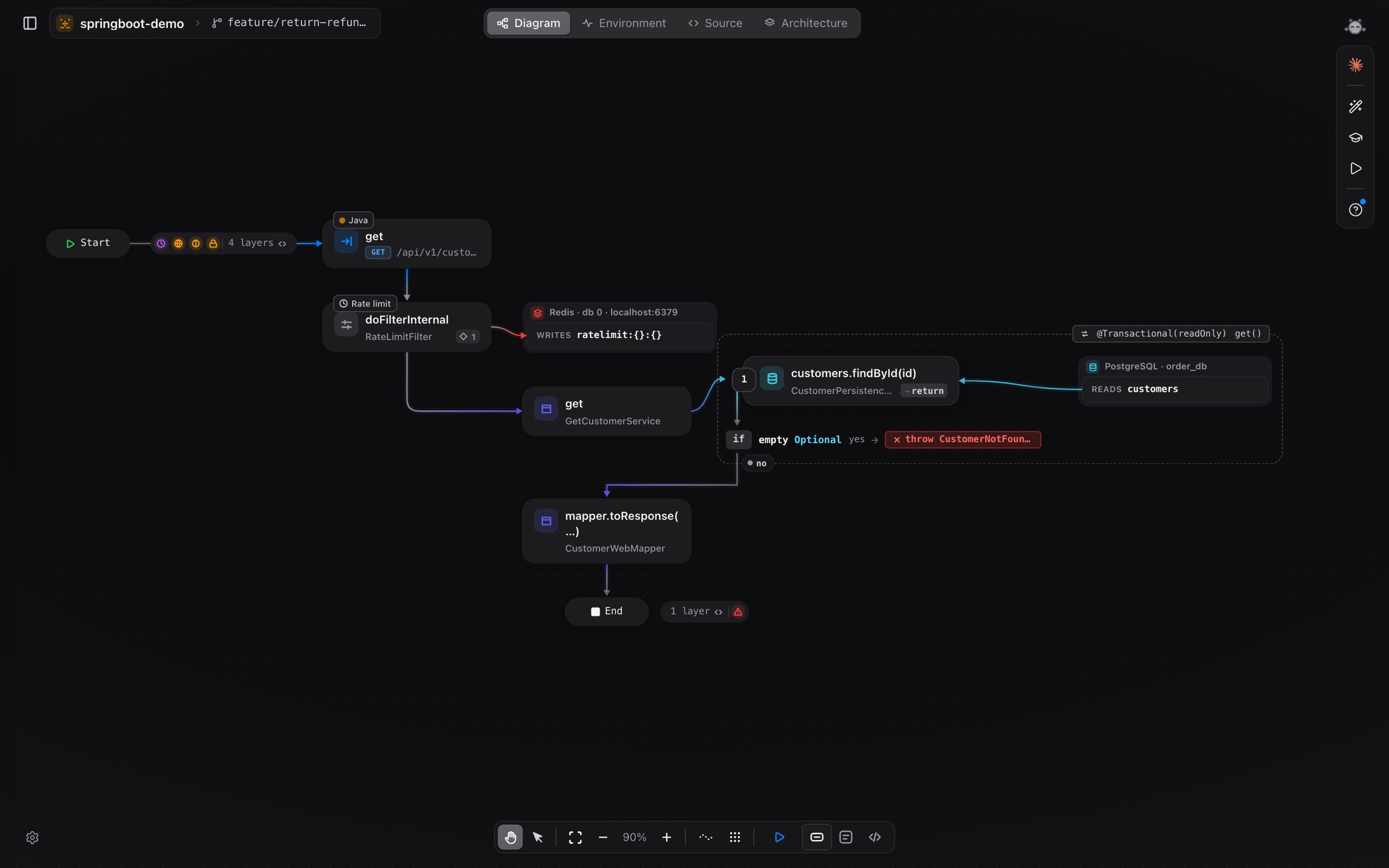
Most of a request’s logic sits in its checks: the guard that stops it, the branch it takes. Until now the diagram showed only some of them.
Every if is drawn
- Checks that stop the request, such as
if … throw,if err != nil { return }orif (!user) return 404, show as a condition with its exit, and a “no” path that continues down. else,else if,switch/matchcases anddefaultsit on one level, so it is clear where each block ends.- Each call shows where its result goes: a variable,
return, the nextif, another call, or nowhere. - With code lines on, a check keeps its own code: the
throworreturn, and what runs right after it.
This works for Java, Kotlin, Python, Go, JavaScript/TypeScript, Rust, C#, PHP, Ruby and C.
Error reports you choose to send
Crashes and errors are collected in the app. When you choose to report one, it goes with your note, a screenshot and the app log.
Settings, rebuilt
Settings has search and new preferences: theme, accent colour, reduced motion, editor and terminal fonts, AI response language, canvas background, agent cursors and a list of shortcuts. When an update is ready, a Restart to update button shows.
Also in 0.1.26 and 0.1.27
- Claude Code, Codex and Gemini sessions walk the flow diagram as their own logo characters: Claude’s spark, the Codex blossom and the Gemini star.
- Several sessions of the same agent each get their own colour, and sub-agents are drawn smaller than their parent.
- Flows list: entries you added by hand can be edited, change type or be removed, and the panel can be resized.
- Agents in vivibe’s terminal keep you at the level you drilled into when they point at something.
For macOS and Linux. More in Diagram.